THE AGENCY

Agent00 Discord community for NBA 2K fans, AMP viewers, gaming streams, IRL adventures, and conversations about his latest content.

THE AGENCY Discord server

Created: September 02, 2022

Members: 44732

Join Discord Server

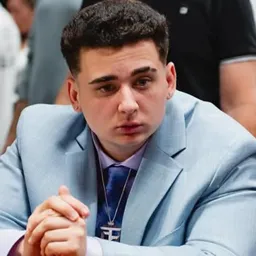
Agent00, also known as Agent or Din Muktar, built his name through NBA 2K videos, but his content has grown well beyond basketball gaming. These days, a stream might involve reacting to internet oddities, trying a new game, heading out for an IRL adventure, or spending hours talking with chat. You never quite know what the next broadcast will turn into.

The Agent00 Discord brings viewers together outside the livestream. Fans can discuss recent broadcasts, share funny moments, and keep up with conversations around his channel. For regular viewers, it’s another way to stay connected when Agent isn’t live.

His role in AMP adds another dimension to the community. Videos and streams with Kai Cenat, Duke Dennis, Fanum, and the rest of the crew often produce some of the most memorable moments in his content. Collaborations with other creators also take him into unexpected situations, far removed from the NBA 2K videos that first attracted many of his viewers.

Basketball is still part of Agent’s identity, but there’s no single game that defines his channel anymore. Some viewers come for the gaming, others for the IRL streams and reactions, and plenty stay for his personality. The Discord gives that audience a shared space to talk about whatever happens next.

How to join the THE AGENCY Discord server?

If you are wondering how to join the discord server "THE AGENCY" to get the latest updates, announcements, and guides, just follow these simple steps:

  1. Scroll back to the top of this page and click the prominent "Join Discord Server" button.
  2. You will be instantly redirected to the official invite link for the THE AGENCY community.
  3. If the direct link doesn't open automatically on your mobile device, simply copy the invite code from the URL, open your Discord app, click the "+" (Add a Server) icon, choose "Join a Server", and paste the code there.

Safe Browsing Reminder

Please note that Discord.Do is an unofficial educational guide and catalog. We are not affiliated with Discord, Inc. We will never ask for your password, email, or login token. True Discord authentication happens strictly on the official discord.com domain. Always verify your browser's address bar and practice digital hygiene!

Leave a Reply

Your email address will not be published. Required fields are marked *