Join the official Build A Mech! Discord server to discuss custom mechs, share rare finds, compare robot builds, and meet other Roblox players.
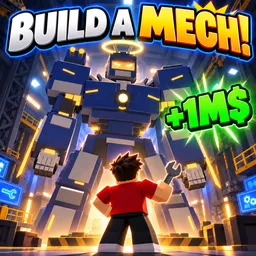
Starting with a rusty scrap robot and ending up in a towering mechanical Titan is the whole appeal of Build A Mech!, a Roblox building and simulator game. Instead of simply choosing a ready-made machine, you collect components from different arenas and gradually assemble your own mechs. Once a build is ready, you get to pilot it yourself and see how far your creations can go.
Not every discovery is about getting bigger. Finding rare paint finishes adds a collecting element, while earning cash even when you’re offline gives you a reason to return and keep working on your collection. There’s a satisfying progression from a scrappy little machine to something that looks like it belongs on a battlefield.
The official Build A Mech! Discord server brings together players who enjoy experimenting with different robot designs. It’s a place to show off your creations, share interesting finds, discuss arena runs, and see what other players have managed to build. You can also follow conversations about the game and keep up with announcements as the experience evolves.
How to join the Build A Mech! Discord server?
If you are wondering how to join the discord server "Build A Mech!" to get the latest updates, announcements, and guides, just follow these simple steps:
- Scroll back to the top of this page and click the prominent "Join Discord Server" button.
- You will be instantly redirected to the official invite link for the Build A Mech! community.
- If the direct link doesn't open automatically on your mobile device, simply copy the invite code from the URL, open your Discord app, click the "+" (Add a Server) icon, choose "Join a Server", and paste the code there.
Safe Browsing Reminder
Please note that Discord.Do is an unofficial educational guide and catalog. We are not affiliated with Discord, Inc. We will never ask for your password, email, or login token. True Discord authentication happens strictly on the official discord.com domain. Always verify your browser's address bar and practice digital hygiene!