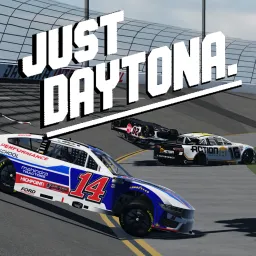
just daytona

Race, drift, and crash in Just Daytona! Join the official Discord for crash clips, event lobbies, updates, and a racing community.

just daytona Discord server

Created: February 19, 2022

Members: 6005

Join Discord Server

Just Daytona is a high-octane Roblox racing game where players drive, crash, and recreate iconic NASCAR wipeouts for thrills. The emphasis: you can race any car, crash spectacularly, or even replicate famous wrecks—creating a blend of competitive driving and chaotic spectacle. High speeds meet creative destruction in every session.
+15

Unlike traditional racing sims, Just Daytona prioritizes freedom and fun over lap times. Public servers may lag, but private rooms become the stages for curated crashes or challenge events. Whether you’re dodging spins or intentionally chasing wrecks, the game offers variety beyond the finish line.
roblox.com

The official Just Daytona Discord server serves as the digital pit crew for fans and drivers. With around 1,200 members online at times, it’s where crash clips are shared, races are organized, and updates or patch notes are announced. The server also hosts lobby matchmaking and community tournaments—emphasizing spectacle as much as speed.
discordbotlist.com
disboard.org

Whether you’re chasing victory or chaos, Just Daytona (RECODE) delivers adrenaline in pixels and crashes in style. Joining the Discord connects you to crash content, race coordination, dev updates, and a community built on the thrill of the wreck.
How to join the just daytona Discord server?

If you are wondering how to join the discord server "just daytona" to get the latest updates, announcements, and guides, just follow these simple steps:

  1. Scroll back to the top of this page and click the prominent "Join Discord Server" button.
  2. You will be instantly redirected to the official invite link for the just daytona community.
  3. If the direct link doesn't open automatically on your mobile device, simply copy the invite code from the URL, open your Discord app, click the "+" (Add a Server) icon, choose "Join a Server", and paste the code there.

Safe Browsing Reminder

Please note that Discord.Do is an unofficial educational guide and catalog. We are not affiliated with Discord, Inc. We will never ask for your password, email, or login token. True Discord authentication happens strictly on the official discord.com domain. Always verify your browser's address bar and practice digital hygiene!

Leave a Reply

Your email address will not be published. Required fields are marked *