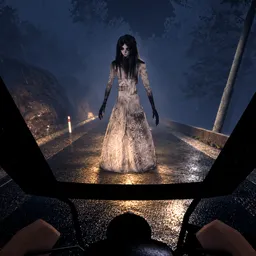
Not every passenger deserves a ride. That’s the unsettling idea behind Pasahero, a Roblox horror game inspired by Filipino folklore. You play as a tricycle driver travelling along a deserted road at night, picking up people along the way and trying to make it home to Lola before sunrise. The problem is that some of your passengers aren’t human, and working out what’s wrong can be a matter of survival.
The official Pasahero Discord server gives players somewhere to compare their experiences and discuss the things they’ve encountered on the road. The different endings leave plenty of room for theories, while cooperative play makes it interesting to hear how other players handle suspicious passengers. You can also meet people for another run and share discoveries that might have been easy to miss on your own.
Sound is an important part of the experience. Headphones are recommended because not every warning comes from what you see. Strange noises, unusual passenger behaviour, and details along the road can all make you question whether it’s safe to continue. The atmosphere draws heavily on Filipino supernatural folklore rather than relying on generic zombie or monster horror.
Whether you’re trying to uncover every ending or simply want to survive another night behind the wheel, the Discord community is a good place to exchange theories, discuss frightening encounters, and keep up with Pasahero’s development.