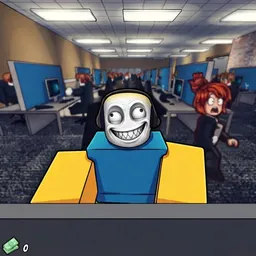
Jump into Scam Together, a chaotic Roblox game about heists and betrayal. Join the official Discord to find a crew, trade loot, and share tactics.
Trust is a rare commodity in Scam Together, a chaotic Roblox experience built around high-stakes heists and strategic backstabbing. Pulling off a clean job means assembling a crew you can vaguely rely on, coordinating complex schemes, and making damn sure you keep the valuable loot when things inevitably go sideways. Every session drops players into unpredictable situations where smooth talking and quick reflexes matter just as much as a solid plan.
Coordination makes or breaks the operation. Teams have to split roles on the fly, dodge rival syndicates, and secure the payout before law enforcement or the clock runs out. Of course, the real danger often comes from inside your own squad when someone decides to cash out early and leave their partners empty-handed.
Finding a trustworthy group of teammates inside public lobbies can feel impossible. Hitting up the official Discord server is practically a requirement if you want to recruit professional partners, coordinate underground trades, swap dirty survival tactics, and grab the latest update codes straight from the developers.
How to join the Scam Together Discord server?
If you are wondering how to join the discord server "Scam Together" to get the latest updates, announcements, and guides, just follow these simple steps:
- Scroll back to the top of this page and click the prominent "Join Discord Server" button.
- You will be instantly redirected to the official invite link for the Scam Together community.
- If the direct link doesn't open automatically on your mobile device, simply copy the invite code from the URL, open your Discord app, click the "+" (Add a Server) icon, choose "Join a Server", and paste the code there.
Safe Browsing Reminder
Please note that Discord.Do is an unofficial educational guide and catalog. We are not affiliated with Discord, Inc. We will never ask for your password, email, or login token. True Discord authentication happens strictly on the official discord.com domain. Always verify your browser's address bar and practice digital hygiene!