First Person Boxing

First Person Boxing Discord for Roblox players to discuss sparring, defensive moves, counters, stamina management, and game updates.

First Person Boxing Discord server

Created: October 12, 2026

Members: 3266

Join Discord Server

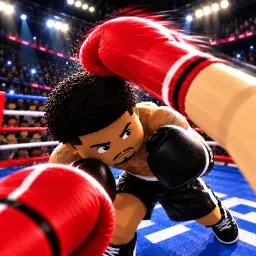
In First Person Boxing, you see the fight through your own eyes. There’s no third-person view to rely on when an opponent comes swinging. You need to read their movements, dodge punches, protect your head and body, and find the right moment to counter. One careless exchange can leave you exhausted and open to a knockout.

The First Person Boxing Discord community gives players a place to talk about their matches, exchange tips, and follow news about the game. Whether you’re trying to improve your defense or looking for other players to spar with, discussing different approaches can help you get more out of each fight.

Stamina matters just as much as landing punches. Swing wildly and you risk slowing yourself down, leaving an opening for your opponent to exploit. Learning when to block, when to slip, and when to strike back is what makes the difference between a lucky hit and a well-earned win.

You can fight other players or practise against AI, making it possible to work on your timing before taking on real opponents. The game supports PC, mobile, and console, so there’s more than one way to step into the ring. The community offers a place to share your experiences, discuss combat mechanics, and keep up with First Person Boxing as it develops.


How to join the First Person Boxing Discord server?

If you are wondering how to join the discord server "First Person Boxing" to get the latest updates, announcements, and guides, just follow these simple steps:

  1. Scroll back to the top of this page and click the prominent "Join Discord Server" button.
  2. You will be instantly redirected to the official invite link for the First Person Boxing community.
  3. If the direct link doesn't open automatically on your mobile device, simply copy the invite code from the URL, open your Discord app, click the "+" (Add a Server) icon, choose "Join a Server", and paste the code there.

Safe Browsing Reminder

Please note that Discord.Do is an unofficial educational guide and catalog. We are not affiliated with Discord, Inc. We will never ask for your password, email, or login token. True Discord authentication happens strictly on the official discord.com domain. Always verify your browser's address bar and practice digital hygiene!

Leave a Reply

Your email address will not be published. Required fields are marked *